How many times have you wished for a different guitar sound in the mixing stage? Want to record your guitar tracks at home but don't have any fancy gear or knowledge how to do it? Want to save money on studio expenses without sacrificing sound quality? Re-amping is the way to go.
How About Bass?
Everything in this guide also works with recording electric bass. How about electric banjo? Sure!
Well, what is re-amping? It can be as simple as re-recording the guitar sound without having to re-record the performance.
How to Record the Tracks
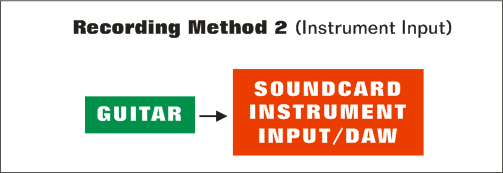
First of all you need a DI box and microphone preamp or a soundcard with instrument input included. If you want to use a DI box, plug your guitar into the input of the box and split the signal into two tracks: DI track and amp track.
How To Set Up a DI Box
Plug your guitar into the input of a DI box and the XLR output to the microphone preamp. Use the link/through connection for splitting the signal to an amp or whatever you want to use for monitoring.
If you record your guitars using the instrument input of your soundcard, you can use a software amp modeller to monitor the signal in real-time.
My advice would be to create an additional track for monitoring purposes and keep it active all the time. This way you don't have to go back and forth with monitoring when you are "punching" the tracks.
Recording Format
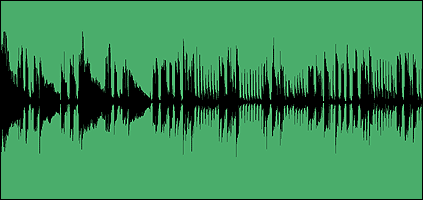
Always record your tracks in 24-bit. Clean DI tracks are highly dynamic and you want all the resolution you can get. When setting the levels, aim for -3 dB below the zero mark on the loudest peaks.
After setting the levels, your DI tracks should look something like this:
This is the sound that the guitar amp gets from your guitar. When you are done, export/bounce your tracks in 24-bit.
Re-Amping
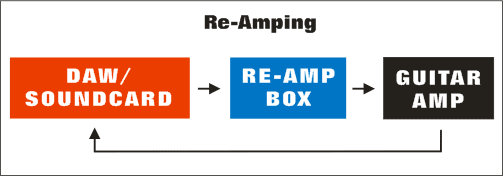
Next thing to do is to create a new session and import the DI tracks to one track consecutively. Route this track to the output where you have connected your re-amp box.
Connect your re-amp box to your amp. Place the microphones, press play and set the levels. Now you can start adjusting your amp settings. It's so much easier to adjust the amp settings when you don't have to play or ask someone to play all the time. This way you will get consistent results and you can easily loop the parts you want.
Re-Amp Box
This is a special box that lets you connect your soundcard or AD converter to a guitar amp. It will match the impedance so that the amp thinks it comes from a guitar. You have many alternatives to choose from, for example Little Labs Redeye, Radial X-Amp & ProRMP and John Cuniberti Reamp.
When you find the sound you are after, hit record and wait. Get a cup of coffee and check out the latest auctions on Ebay. When you come back, you are almost done. Just slice and bounce (or export) the files and that's it. You are done!